
PCAP and PcapNG · Free for macOS 26

Open PCAP and PcapNG files on your Mac.

Cocoa Packet Analyzer opens the capture files that tcpdump, other packet analyzers and network devices write, and turns them into readable conversations: every field of every packet, filters on any of them, and HTTPS in plain text when the keys come with the file. Native, free, and nothing leaves your Mac.

Both versions open PCAP and PcapNG files. Which one do I need?

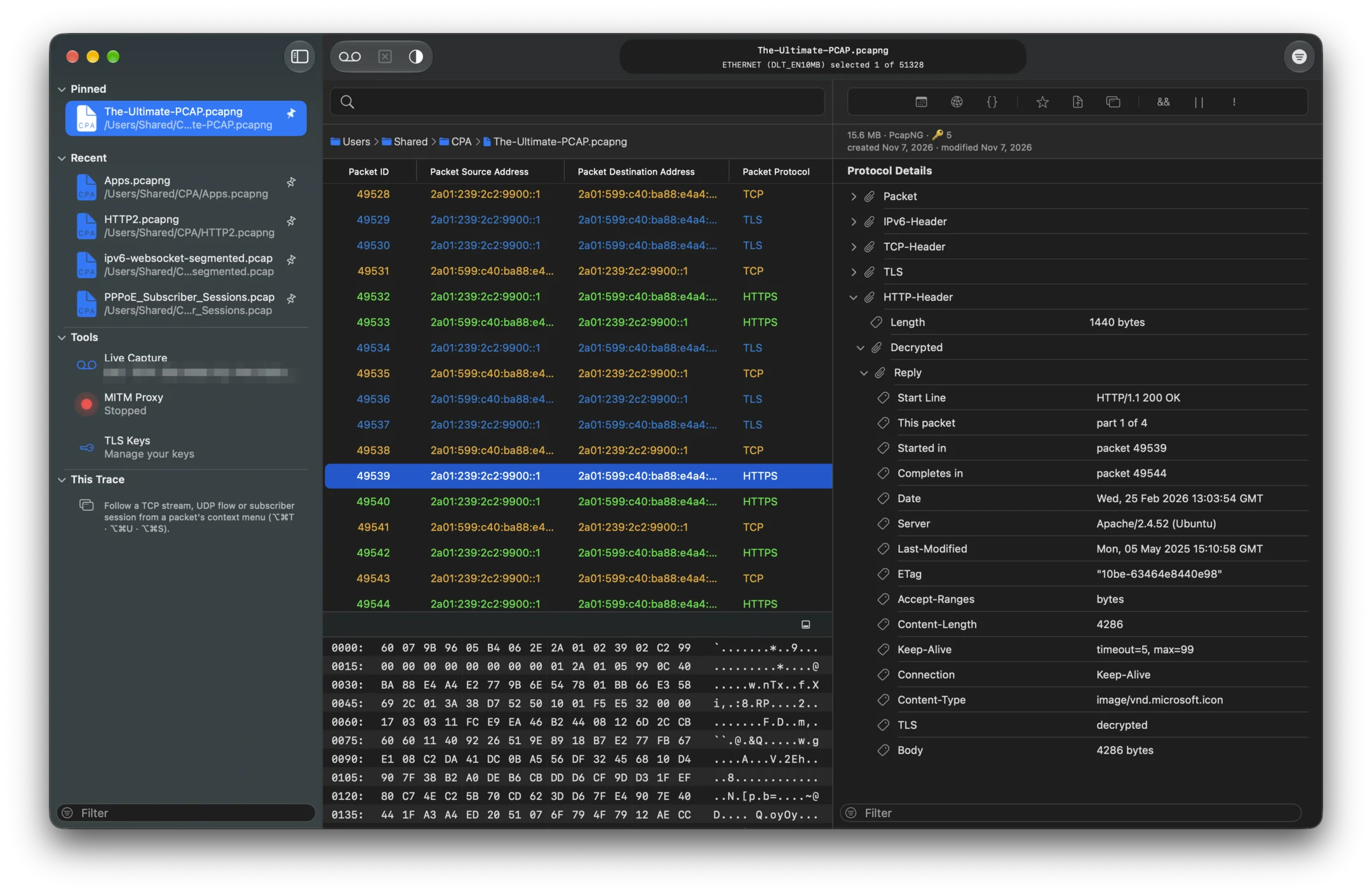
A PcapNG trace in Cocoa Packet Analyzer: pinned and recent traces in the sidebar, the file’s size, format and five TLS keys above the details, and a decrypted HTTP reply with its headers
Your traces in the sidebar, the decrypted reply in the details.

Three ways to open one.

  • Double-click the file. If another app opens it instead, select the file in Finder, choose File ▸ Get Info, pick Cocoa Packet Analyzer under Open with and click Change All…. Every file with that extension opens in it from then on.
  • Drag it onto the app’s icon in the Dock.
  • Choose File ▸ Open… in the app.

It reads .pcap and .cap (PCAP), .pcapng and .ntar (PcapNG), whichever tool wrote them, with Ethernet, Wi-Fi with RadioTap headers, loopback, PPP, Linux cooked and raw IP as the link type. It opens HAR files too, the request logs a browser saves from its developer tools.

Look inside before you open it.

Select a capture in Finder and press the Space bar: Quick Look shows its first packets, the time span it covers, its top protocols, talkers and apps, and the program that wrote it, without starting the app.

Spotlight searches inside your traces as well. Type a host name, an address, a protocol or an app, and the files that contain it come up, whatever they are called.

Read it, field by field.

More than 50 protocol analyzers, from Ethernet to HTTP/3.

The packet list shows each packet’s source, destination and protocol. Select one and its details unfold layer by layer, with the field’s bytes marked in the hex view. Click any field to filter the trace on it, keep the queries you need again, and come back to your last ten.

Follow

From a packet to the whole conversation.

Follow TCP Stream puts a connection back together as text, request and reply. Follow UDP Flow pairs datagrams that belong together, and Follow QUIC Stream does the same inside QUIC. Traces with millions of packets open without a stall and stay light in memory.
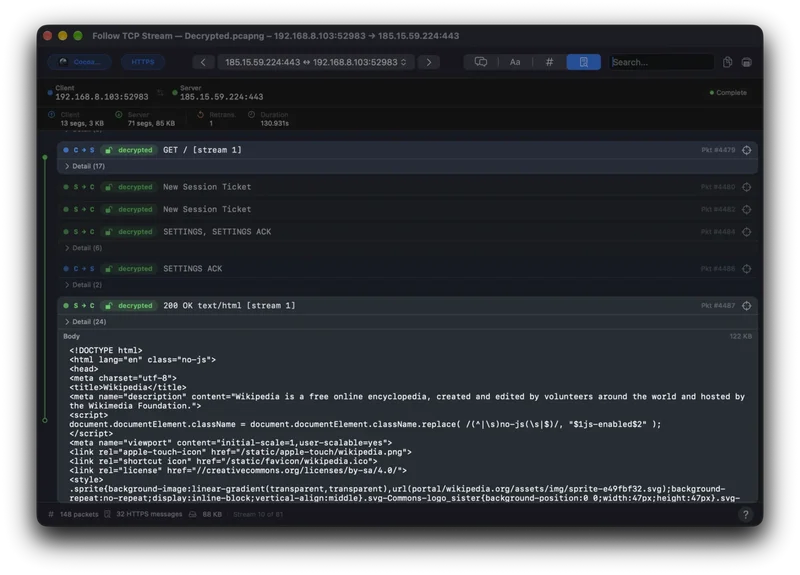

Follow TCP Stream: an HTTP/2 GET request and its 200 OK reply as readable text

Encrypted traffic

HTTPS in the file? Bring the keys.

A PcapNG file can carry the TLS keys of its own sessions. Open one, and HTTPS, HTTP/2 and HTTP/3 show as requests and replies straight away. For a trace without keys, add the key log that was written while it was recorded, in the TLS Keys window under Sources, or save it next to the trace under the trace’s name with the extension .keys: it is then read as soon as the trace opens. The same window lists every session in the trace and says, for each one that stays encrypted, why.

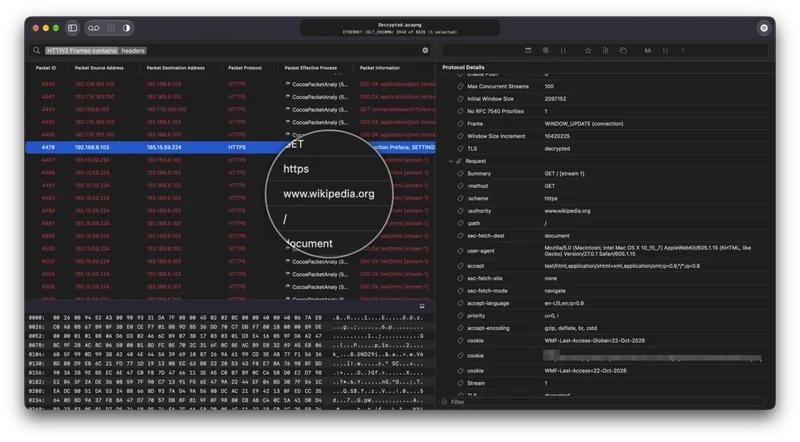
A decrypted HTTP/2 request to www.wikipedia.org with its method, authority, path and user-agent headers in the detail tree

PCAP or PcapNG?

Both hold the same thing: packets as they crossed the wire, each with a time stamp. They differ in what else fits in the file.

PCAP is the older, simpler format. Every packet in the file shares one link type, and there is no room for anything but the packets.

PcapNG (“next generation”) is built from blocks. One file can hold packets from several interfaces, comments, and the secrets that decrypt its TLS sessions, so a trace stays readable when you archive it or send it on. Captures that Cocoa Packet Analyzer records with the apps behind the packets keep those apps in PcapNG too.

Cocoa Packet Analyzer reads and writes both. File ▸ Save As… lets you pick the format; a trace with keys starts on PcapNG, and saving a PcapNG file as PCAP asks first, because the comments, keys and app names do not fit.

Questions.

Which files does Cocoa Packet Analyzer open?

PCAP files (.pcap, .cap) and PcapNG files (.pcapng, .ntar), whichever tool wrote them, and HAR files, the request logs browsers save from their developer tools.

Can it open a compressed .pcap.gz file?

Not directly. Double-click the .gz file in Finder to unpack it, then open the .pcap or .pcapng inside.

How do I convert PCAP to PcapNG, or PcapNG to PCAP?

Open the file and choose File ▸ Save As…, then pick PCAP or PcapNG as the format. PCAP has no place for comments, TLS keys or the app behind each packet, so saving a PcapNG file as PCAP drops them; the app asks before it does.

Is it free?

Yes, with no trial, no account and no subscription. The download and the Mac App Store version are both free, and both open PCAP and PcapNG files; the App Store version leaves out live capturing.

Which macOS do I need?

macOS 26 or later, on Apple silicon or Intel. Macs on macOS 10.14.6 – 15.7.4 can use version 2.1.4 from the downloads on the home page.

Does the trace leave my Mac?

No. Cocoa Packet Analyzer reads the file locally and uploads nothing; it needs no account and no online service.

Cocoa Packet Analyzer

Got a trace? Open it.

macOS 26 or later · Universal · Notarized by Apple · brew install --cask cocoapacketanalyzer

Capturing live, decrypting with the proxy, and the rest: everything Cocoa Packet Analyzer does.