
HTTPS · HTTP/2 · HTTP/3 · Free for macOS 26

Decrypt HTTPS on your Mac.

A capture shows that your Mac talked to a server, but not what it said. Give Cocoa Packet Analyzer the session keys, and HTTPS, HTTP/2 and HTTP/3 turn back into requests and responses: from an SSLKEYLOGFILE key log, from an app it opens with key logging, or through its built-in proxy, which reads an iPhone or iPad too.

Free, no account, and nothing leaves your Mac. Which version do I need?

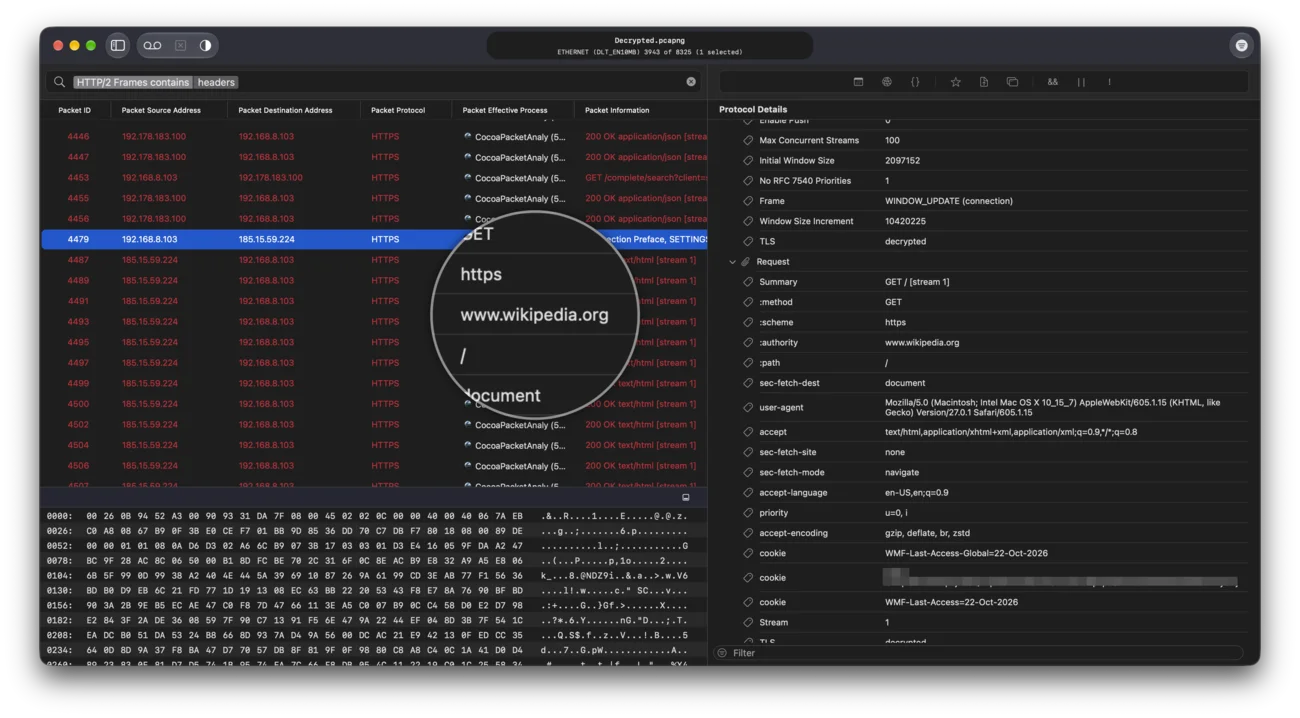
A decrypted HTTP/2 request to www.wikipedia.org with its method, authority, path and user-agent headers in the detail tree
An HTTP/2 request from a capture, every header readable.

Why a capture alone cannot read HTTPS.

Every HTTPS connection starts with a handshake in which client and server agree on a fresh secret. Nobody watching the network can work it out, which is the point of TLS. Both ends know it, though, and either end can write it down.

A key log is that written-down secret: one line per TLS session, linking the session to its keys. With it, Cocoa Packet Analyzer opens the encrypted records of a capture, whether you recorded it a minute ago or last month. The packets stay as they are; the keys are the missing piece.

There are three ways to get them.

Key log

1. Let the app write its keys: SSLKEYLOGFILE.

Chromium-based browsers (Chrome, Brave, Edge), Firefox, Electron apps and curl built with OpenSSL append their session keys to the file the SSLKEYLOGFILE environment variable names. Quit the browser completely, then start it from Terminal with the variable set, for example:

SSLKEYLOGFILE=~/tls-keys.log "/Applications/Google Chrome.app/Contents/MacOS/Google Chrome"

Capture while you browse, then add tls-keys.log under Sources in the TLS Keys window (Trace ▸ Trace TLS Keys…). The matching sessions decrypt. Or give the key log the trace’s name with the extension .keys and put it next to the trace: it is read as soon as the trace opens.
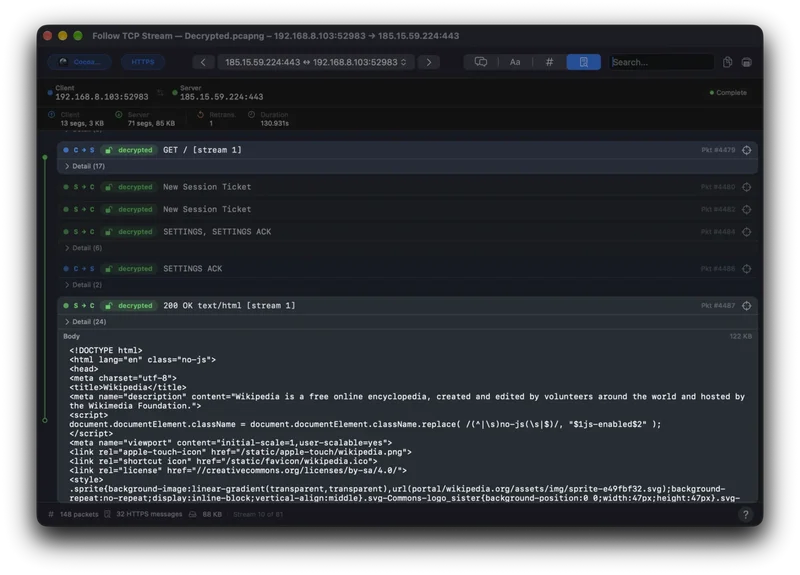

Follow TCP Stream on a decrypted HTTP/2 connection: the GET request to www.wikipedia.org and its 200 OK reply as readable text

Open with key logging

2. Or let Cocoa Packet Analyzer start the app.

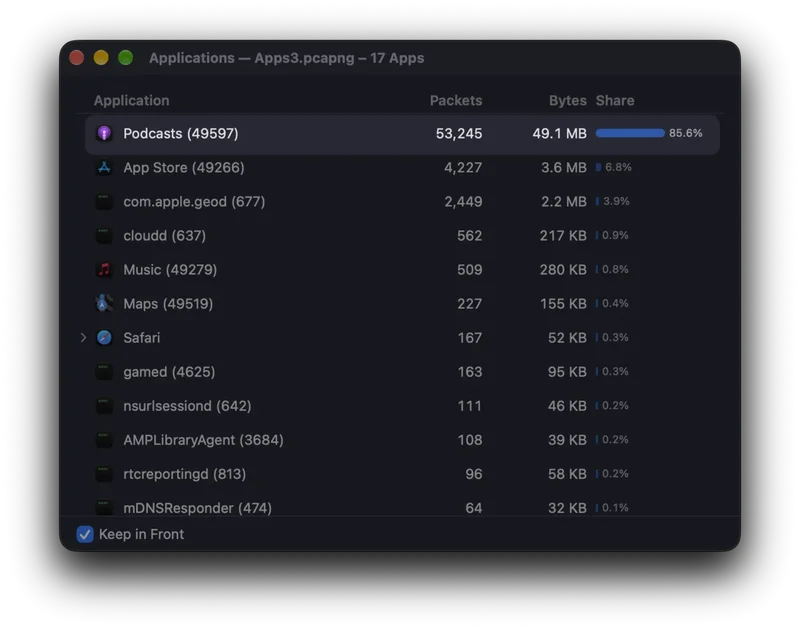
Choose File ▸ Open App with Key Logging… and pick Chrome, Firefox or an Electron app. Cocoa Packet Analyzer checks that the app reads the variable, asks you to quit it if it is running, and opens it again with its keys going straight into the live key log. Its connections decrypt in the running capture, with no Terminal, no proxy and no certificate. The Applications window marks each app with a key badge: how many of its connections have keys.

This one is in the download; the Mac App Store version reads key log files.

The Applications window listing Podcasts, App Store, Music, Maps and Safari with their packets, bytes and share

Proxy

3. Or put the proxy in the middle: Safari, apps, iPhone.

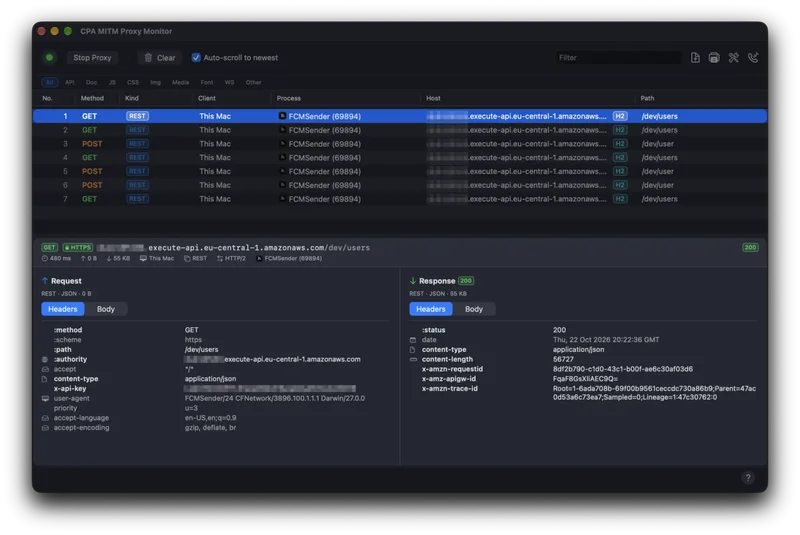
Safari and Apple’s own apps never hand out their keys. For them, open File ▸ MITM Proxy…, trust its certificate and start it. It stands between the app and the server, so it holds the keys itself: the monitor lists every request live, with the app that sent it, and your capture decrypts too.

For an iPhone or iPad, choose File ▸ Connect a Device…, scan the QR code and follow the steps on the device: install and trust the certificate, set the Wi-Fi proxy. Turn the proxy off when you are done, and read only traffic you are entitled to.

The proxy monitor listing an app’s API requests, one GET selected with its request and response headers

What you see once it decrypts.

  • HTTP/1.1 and HTTP/2 as requests and responses, with headers and bodies; on HTTP/2 every stream on its own.
  • HTTP/3: QUIC decrypted at every level, with frames and headers you can filter on.
  • gRPC calls message by message, field by field, without the service’s .proto file. WebSocket messages too.
  • Follow TCP Stream puts a decrypted connection back together as text, request and reply.

Decryption covers TLS 1.2 and TLS 1.3. Sessions that negotiated TLS 1.0 or 1.1 stay encrypted.

A session stays encrypted? The TLS Keys window says why.

Trace ▸ Trace TLS Keys… lists every TLS session in the trace with its host, and puts the ones that do not decrypt at the top, each with its reason:

  • No key material: nothing was recorded for this session. Usual for apps that did not write a key log and did not go through the proxy.
  • Missing …: some secrets are there, and the missing one is named. Without the server’s secret you see what the client sent, not the reply.
  • Key does not match this session: the key log has a line for this session’s identifier, but it does not open the records.
  • No TLS handshake found: the capture started after the connection opened. Start capturing first, then load the page.
  • TLS version not supported for decryption: the session used TLS 1.0 or 1.1.

The keys stay with the trace.

When you open or save a trace, Cocoa Packet Analyzer keeps the keys that belong to it, so it still decrypts months later. Save it as PcapNG and the keys travel inside the file: a colleague opens it and reads the HTTPS right away. To use the keys elsewhere, Export Keylog… in the TLS Keys window writes them as a standard key log file.

Keys open the traffic they belong to, so treat a key log like the traffic itself. They stay on your Mac; nothing is uploaded.

More on the file formats: opening PCAP and PcapNG files on a Mac.

Questions.

What is SSLKEYLOGFILE?

An environment variable that names a file. Programs that support it, such as Chromium-based browsers, Firefox, Electron apps and curl built with OpenSSL, append one line per TLS session to that file: the session’s identifier and its secrets. With that key log, Cocoa Packet Analyzer can decrypt the sessions in a capture.

Can I decrypt Safari’s HTTPS?

Yes, through the built-in proxy. Safari and Apple’s own apps never write their session keys to a key log, so a key log cannot decrypt them.

Can I decrypt an iPhone’s or iPad’s HTTPS?

Yes. Choose File ▸ Connect a Device…, scan the QR code with the device and follow the steps: install and trust the proxy’s certificate, then set the Wi-Fi proxy. Apps that pin their own certificates refuse the connection.

Which TLS versions can it decrypt?

TLS 1.2 and TLS 1.3, including TLS inside QUIC for HTTP/3. Sessions that negotiated TLS 1.0 or 1.1 stay encrypted.

Does the Mac App Store version decrypt HTTPS?

Yes, from key logs, from PcapNG files that carry their keys, and through the proxy, which you point your Mac at yourself. Opening an app with key logging and capturing live are in the download only. Which version do I need?

Do the keys or the traffic leave my Mac?

No. Keys are stored on your Mac next to the traces they belong to, and the proxy runs locally.

Cocoa Packet Analyzer

See what your apps actually send.

macOS 26 or later · Universal · Notarized by Apple · brew install --cask cocoapacketanalyzer

Traffic by app, VPNs, the Plugin SDK and the rest: everything Cocoa Packet Analyzer does.